
Searching For The Tool That Holds My Thinking Together

One of the most difficult things when you suddenly switch careers is to adapt to new workflows and create a different mindset from what you're used to having.
Not just in terms of how you think and are used to working, but also the tools that you used for years, and how they don't fit your needs anymore.
That happened to me with Notion.
I started using Notion back in 2020, right in the middle of my architecture and visualization work. It made complete sense then: clients to track, projects to manage, deliverables to organize. Notion pulled everything into one spot with almost no effort. And since everyone around me was using it, it felt like the right choice.
But even before I was certain about leaving that world (around April/May 2025, when the fatigue really hit), I had been using Pop OS regularly for work, especially for visualization. Notion on Linux meant Notion in the browser, and I was already losing my patience on how slow that was. Typing lagged and the experience was just worse than on a native app (even though on the app it's still slow). When I seriously started thinking about the pivot and leaving architecture behind, I knew I wanted to switch to Linux full-time. That meant every tool in my stack had to work there properly, and Notion didn't. No native desktop app (only Windows and macOS), no real offline mode back then (and even after they finally added offline mode in August 2025, it's still desktop and mobile apps only). Browser users get nothing. Manual per-page caching, some blocks don't work offline, and on Linux you're out of luck anyway. That friction built up quietly at first, then louder as I started questioning the whole setup.
Things change, and I changed. I walked away from the studio rhythm, the client calls, and I needed a different kind of space now. Somewhere to capture thoughts, log what I'm learning in the courses, draft posts for this blog, connect random ideas that might turn into something, and maybe personal stuff. Basically what everyone calls the “Second Brain” for this pivot phase (but not exactly like Tiago Forte's concept).
Notion kept growing, but in directions that had nothing to do with me. More team features, shared calendars, agents routing tasks for departments. Great for companies, not for one guy trying to think clearly on his own. Reorganizing databases took more time than actually writing in them. Worst of all, everything lived on their servers. Five years of notes, reflections, half-formed plans, locked in a "vault" I didn't own, and exporting the content doesn't work in a clean way, you end up losing something along the way.
I still miss a couple of things, like formulas, that were handy for quick math inside pages, integrations that worked great, and all the community around it building the most amazing setups. But those perks couldn't outweigh the lag, the team-first direction, the Linux incompatibility, and the constant feel that everything I was saving there wasn't really mine.
So I went looking for an alternative.
Obsidian was the first and obvious choice. Obsidian is really, really good: local markdown files you own forever, no lock-in, links between notes feel alive, the graph view shows connections you didn't even know were there. I loved seeing that “web” grow as I linked ideas. Plugins let you add almost anything (boards, calendars, queries), the community is full of people who build beautiful crazy systems. I set up a vault, played with plugins, and tried some workflows. Parts of it clicked hard, like the freedom of plain text files and the organic way ideas link up.
But it didn't settle. The thing is, I wanted something more visual in how things were organized. Not just pages stacked in folders or linked by text. I wanted to see and categorize my thoughts in ways that felt less linear, more modular. Drag stuff around, switch how I looked at the same group of notes without reconfiguring everything. Obsidian's strength is in the text and the links, which is great for many, but for me, it wasn't the solution I was looking for. To get visual categorization or quick view changes I had to lean on plugins and setups that added steps I didn't want to think about every time. It was powerful and flexible, and I respect that a lot. Just not quite the workflow I needed for jumping between all my content.
I tried a couple more in the same family: Notesnook caught my eye because of the strong privacy focus (open-source, zero-knowledge encryption, end-to-end everything, even self-hostable sync if you want). Notes live in notebooks and tags, with Markdown, tasks, tables, embeds. It feels clean and secure, no tracking, has a nice visual appeal, and the apps are solid across devices. I liked the peace of mind it gave, but organization stayed notebook and tag-based. No real visual restructuring or multiple views on the same content without extra effort. It was closer to a private/encrypted version of traditional note apps than the modular system I was after.
Joplin was next. Also, fully open-source, local-first with markdown notes, notebooks, tags, to-do lists, even built-in end-to-end encryption for sync. It handles images, PDFs, reminders, web clips, syncs with Dropbox or their cloud (paid), and everything stays in open formats you control. Simple, reliable, privacy-respecting. I appreciated how straightforward it is, but again, it felt like a solid notebook system: hierarchical, text-focused, plugin-extensible but not inherently visual or flexible in customization.
I kept going. Logseq, AppFlowy, AFFiNE, Capacities. Each had something going for it: open-source credentials, interesting takes on structure, clean design. But they all hit a wall somewhere. Too locked into outlines, too close to a Notion clone, too team-oriented, or too dependent on someone else's cloud. Nothing brought the combination I was after: local-first, open-source, privacy by design, and a native Linux app that didn't feel like an afterthought.
And an important note, some of these apps didn't even have a Linux desktop app. That was an instant deal-breaker.
Then Anytype showed up. I almost scrolled past it. “Another one…” I said to myself. But something clicked, I had one of those feelings and the little voice in my head said that I should give it a proper look. So I decided to scroll throught their website and then watch some videos (the official ones, and others from people using it). And the way it handles objects hooked me instantly.
The difference between all the others and Anytype is that everything is an object. A note, a saved link, an idea, a task, everything. Give it a type, add properties, connect it to other objects or projects, and you get that beautiful graph view just like Obsidian. The same content can look like a list, a table, a kanban, a gallery, whatever I want it to look like at that moment or in the specific project. That visual switch and modular feel clicked in a way none of the others did. It let me categorize and see things without being stuck in pages or folders.
The privacy side sealed the deal. Data stays on my devices: encrypted locally, keys are mine alone, sync is peer-to-peer, no company can see inside. Not because they promise not to, but because the design makes it impossible. And the whole thing is open-source: desktop app, mobile app, sync protocol, everything is on GitHub. Anyone can read the code if they want to. Plus, native Linux app that just works flawlessly.
All this matters more than the missing features right now.
My setup is simple: four areas, plus a journal space I keep separate.
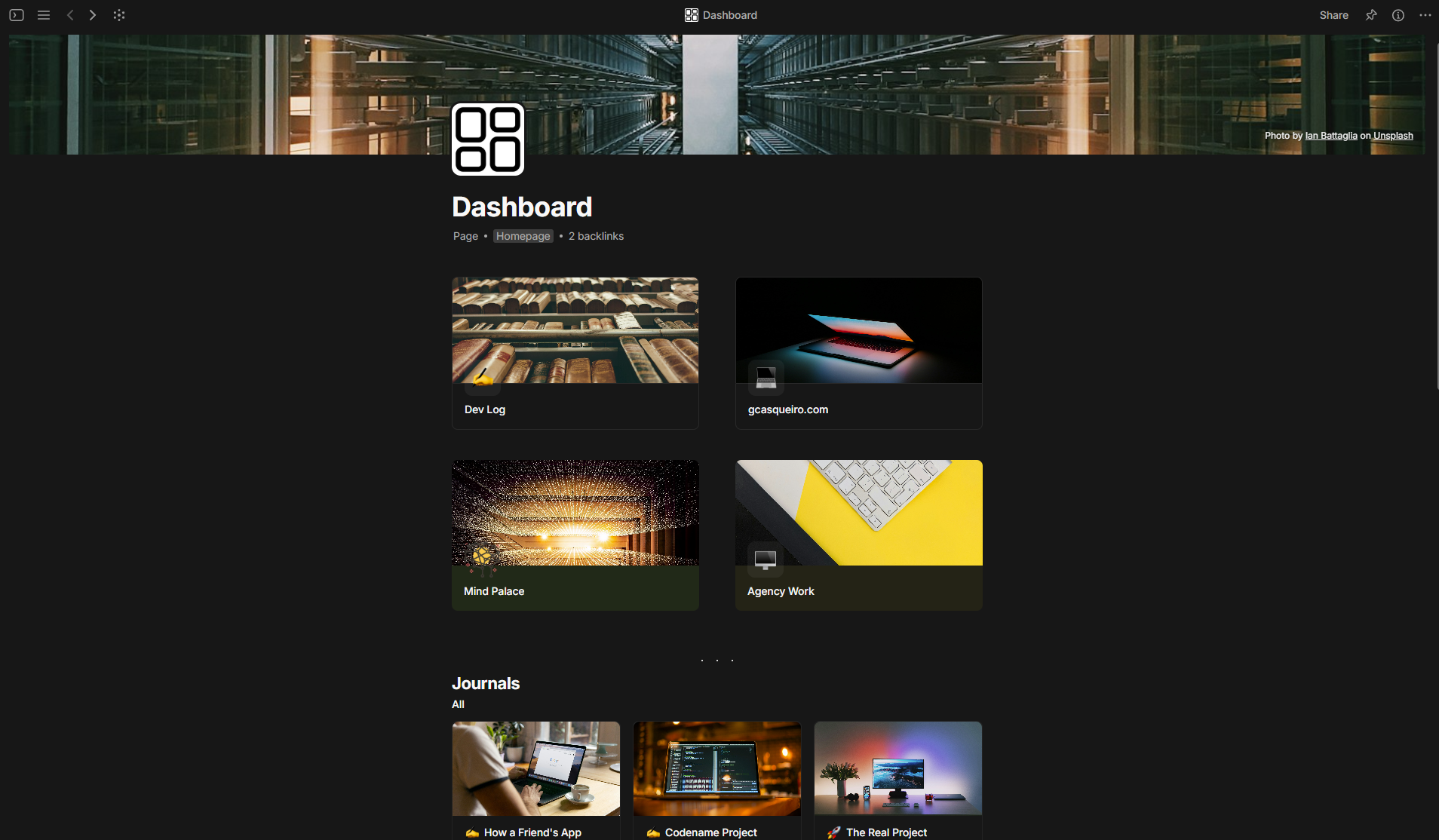
Area number 1 is my “dev pivot corner”: course notes, ideas for future projects, late-night experiments, and the development plan for something I've started to create a couple of days ago. Keeping this separate from the rest helps this phase feel real.
The second area is for this blog, where I keep post ideas and draft the posts. Post ideas aren't just titles and topics for the complete text. They link to research objects, get status tags, pull in related bits automatically. When I sit to write, context is already in the right place waiting to be gathered and composed into its final form.
Number 3 is my Mind Palace. Basically it's just a pure link dump. Articles, tools, links I spot while browsing. No organization guilt here, I just keep saving those links and delete them from time to time, when they aren't relevant or needed anymore. Bookmarks are objects too, so they can connect to the other objects in different areas if they matter.
The fourth and final area is for the agency work. Quick filters show what's urgent, some to-dos for client work, future projects plans, projects in development notes, and nothing more.
Journals stay apart. They have their own space below these four areas. These are just daily thoughts, which I mostly write at the end of the day, to keep a record of what happened, breakthroughts, completion of work phases, and some ideas that can result in future projects. Also, I'm trying to develop the habit of daily journaling, since it seems it's good to help you organize your thoughts and think more clearly (or so they say).
I've tried complicated hierarchies before, and they all collapsed. This one sticks because it asks almost nothing extra. And I intend to keep it simple just as it is.
Anytype is young, and it's easy to understand that. No formulas, no calendar sync (understandable, if the focus is on privacy and not being connected to external services) and other features that most similar knowledge management apps already have. Some customization hits arbitrary walls, mobile sync sometimes drags, interface isn't as polished as others, but none of these are real deal-breakers. I've also been poking with the API, trying to see if it is possible to create a better version of their official web clipper, but it seems the API still has some limitations for what I wanted to do. Maybe another time in a near future.
For now Anytype is where my thinking lives. It follows me instead of fighting me. Local-first, open code, that visual object way of seeing and switching views. And I'm happy with it. I'm not looking for the perfect knowledge management app (it doesn't exist), just something that holds together while I keep moving.
None of this means those other tools are bad. On the contrary. Most of them are genuinely impressive, and for someone with a different workflow or different priorities, any of them could be the perfect pick. Anytype just happens to match how I think and what I need right now. And it isn't perfect by any chance. Someone else might try it and hate everything about it.
May The Code Be With You! 🚀




Member discussion