
Starting with a Clean Slate
When you're pivoting careers, or want to focus on something really important, you need to eliminate distractions. I realized pretty quickly that my old setup wasn't going to work anymore.
For the last six years, I've been dual booting Windows 10/11 and Pop OS on my main desktop. Pop OS was perfect for what I needed then: Blender work, archviz renders, NVIDIA drivers that actually worked without breaking every other update. Pop OS is solid for creative work, but I wasn't going to do that anymore.
And honestly, it started feeling wrong. The interface felt too "playful", too geared toward the creative workflow I was leaving behind. Every time I turned my desktop on, I was getting constant reminders or work I wasn't doing anymore.
As for Windows 11, I kept it on a separate drive for the occasional client project that required specific software, like Affinity, and mostly for gaming. Yeah, I know now Linux is getting pretty good for gaming, but I didn't have the time to dive into that. As for the specific software, in this case it was the Affinity suite (Photo, Designer, Publisher). To be 100% honest here, all the Linux alternatives available aren't there yet. GIMP, Scribus, Inkscape, they're all good programs with a lot of potential, but for real professional work, they still lack some really important stuff. At least for me. I tried several times to use them, but it just didn't stick.
The truth is, Windows 11 is a cluttered mess. All the copilot and recall stuff (I removed them, but it's still annoying and invasive), constant notifications, updates that restart your machine at the worst possible times and in the end changes things that shouldn't be changed. It drains resources and focus. I couldn't afford an OS that slowed me down or tempted me with distractions when I'm trying to learn.
I needed something different. Something clean, something that would let me focus on learning to code without the need to "fight" the operating system.
The Search
I spent weeks researching, asked people, read comparisons, watched way too many YouTube videos about Linux distros. The goal was simple: find an OS optimized for development work, Arch-based for rolling releases and up-to-date packages, but stable enough that I wouldn't spend all my time troubleshooting instead of learning.
It came down to two options: Omarchy and CachyOS.
Omarchy looked perfect on paper. Created by David Heinemeier Hansson (DHH), the Ruby on Rails guy, it's an opinionated Arch setup that comes preloaded with developer tools, modern editors, productivity apps, even some AI integrations. Everything tuned for a beautiful and efficient workflow right out of the box. Just install and start coding.
But there were two problems.
First, Omarchy uses Hyprland, a dynamic window tiling Wayland compositor. This means that everything is keyboard-driven. You arrange windows with key combinations instead of dragging them around with a mouse. It does support mouse and trackpad input, but the whole system leans hard into keyboard shortcuts and dynamic tiling. As the official manual states: "Everything in Omarchy happens via the keyboard — EVERYTHING! When the system first starts, you literally can't do a thing with the mouse alone."
It's incredibly efficient once you learn it, and I only heard good things about it, but there's a steep learning curve.
I thought about it, and really considered it, but then I realized: I'm already learning JavaScript, Node.js, and React. I'm retraining my brain to think like a developer after 15 years of thinking like an architectural designer. Adding "learn an entirely new way to interact with your computer" on top of that, isn't something I'm ready for at the moment. I'd spend more time memorizing Hyprland shortcuts than actually writing code.
Second, the preinstalled apps. Omarchy comes with things like Zoom, Spotify, Hey, Basecamp, Fizzy, ChatGPT, Google Maps, already set up. Some people might like that, for me it clashed with what I'm trying to build: a privacy-first minimal setup where I control what's installed.
The Decision
So I went with CachyOS instead.
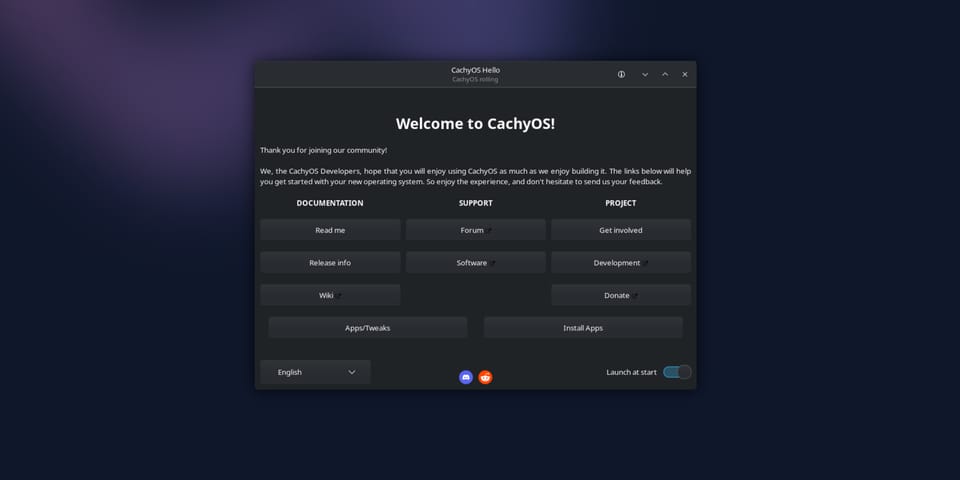
CachyOS is Arch-based, just like Omarchy, but it's focused on performance optimizations. Custom kernels, faster package management, a straightforward installer that doesn't assume you're a Linux expert (and truth be told, I am not). It lets you start minimal and build up, which fits my objectives: keep it open-source, lightweight, and under my control.
It uses KDE Plasma as the desktop environment (among others, but that's the one I chose), which is familiar. Normal windows you can click and drag, a taskbar, a start menu, everything that makes the transition smoother. Everything works the way I expected it to work, just faster and cleaner.
It's my first time using an Arch-based distro. I'd heard the horror stories about complicated installations, things breaking randomly, spending hours in the terminal fixing dependencies. I was preparing myself mentally for the pain.
But honestly? The transition has been easier than I expected.
CachyOS has a graphical installer, you just pick your options, it sets everything up, and it just works. KDE Plasma feels polished and responsive. The package manager uses pacman instead of apt (took a minute to adjust), but once you get used to the syntax, it makes sense. And everything I've installed so far has just worked.
No weird dependency conflicts, no broken updates, no random crashes. Just a clean, fast system that gets out of the way and lets me work.
That's the biggest difference from Pop OS. Don't get me wrong, Pop OS is great for what it's designed for. But I spent way too much time over the years dealing with broken packages after updates, PPAs that stopped working, apps that needed three different workarounds to install properly.
With CachyOS, I install something, it works. That's it. At least that's my (short) experience so far.
Why This Matters
This isn't just about switching operating systems. It's about alignment.
When you're making a big change, everything needs to support that change. My old setup was optimized for architectural design and visualization work. Starting fresh with CachyOS means starting with an environment built for what I'm actually doing now. Clean desktop, development tools, terminal right there when I need it. No leftover architecture projects staring at me from the file manager (it was all moved to an external backup drive).
It's psychological as much as practical. When I turn on my desktop now, I'm in "learning to code" mode immediately. The environment reinforces the shift. The system is so fast and responsive I don't even think about it, which is exactly the point.
What's Next
I'm still setting things up, installing tools as I need them instead of front-loading everything. Right now I'm using VS Code because that's what Jonas recommends in the courses, and I want to follow along without the need to stop and search where something is. But once I finish the courses I'll switch to VSCodium or Zed. They align better with my open-source, privacy-first philosophy. VS Code works great, but I'd rather use something that doesn't have Microsoft telemetry baked in.
Probably in the next post I'll go into the specific tools and configurations I'm running on CachyOS. What's installed, what I'm using daily, how it all fits together. For now, I'm just getting comfortable with the environment and focusing on the courses. Maybe I'll also add a sneak peak on the first project I'm trying to develop.
May The Code Be With You! 🚀

Member discussion